AI as Playtester: Building a REST API Inside a Godot Game So Claude Can Play It
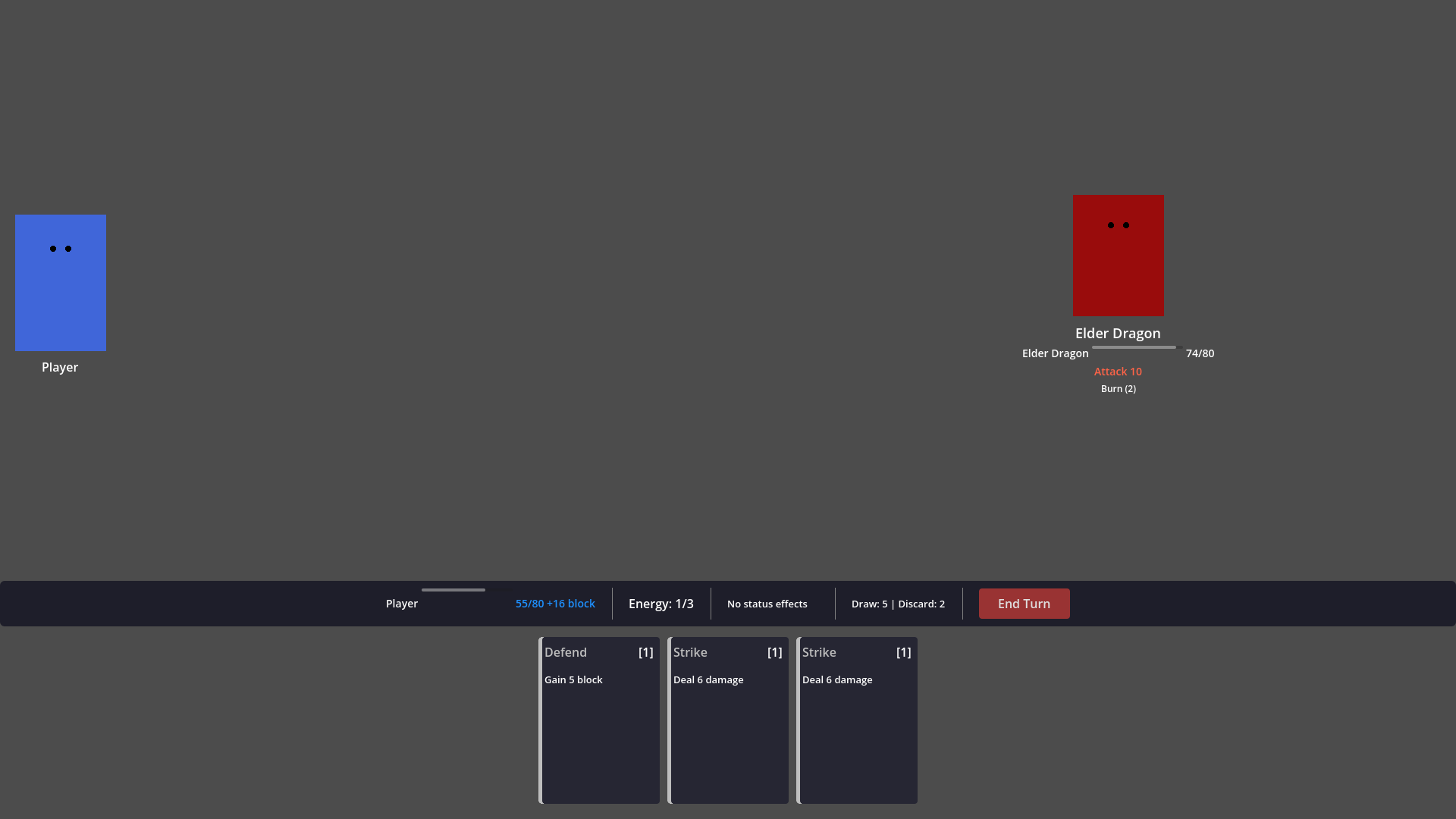
I've been building Spell Surge, a roguelike deckbuilder in Godot. Cards, crafting, status effects, enemy patterns—the kind of game with hundreds of interacting systems that need careful balancing.
The problem was obvious: I needed playtesting. Lots of it. But I'm a solo dev, and playing through a 10-floor run to test whether the Elder Dragon's burn mechanic interacts correctly with the player's block timing takes 30 minutes per attempt. And I'd need dozens of those attempts, making different choices each time.
So I did something that felt a little unhinged: I built an HTTP server directly inside Godot's game loop, exposed the entire game as a REST API, and then told Claude to play the game through curl commands.
It found a fundamental design flaw in under an hour that I'd missed across weeks of manual testing.
The Problem: Playtesting Doesn't Scale
Deckbuilders are deceptively hard to test. Every run is different—different map layout, different card draws, different reward choices, different enemy combinations. A bug might only surface when you play a Burn card against an enemy that's about to block on the exact turn that your Soak stacks are clearing.
Manual playtesting catches the obvious stuff. The crash on the reward screen. The card that costs negative energy. But it misses the subtle balance issues that only emerge from systematic play across many runs.
I needed a way to play hundreds of runs, tracking every number, every interaction, every state transition—without my eyes glazing over by floor 3.
The Solution: A TCP Server in _process()
Godot doesn't have a built-in way to control a running game from outside. But it does have TCPServer, and it does have _process() running every frame. So I built a hand-rolled HTTP server directly inside the game.
The implementation is almost comically simple in concept:
var _tcp_server: TCPServer = null
var _connections: Array = []

func _process(_delta):
    _poll_server()

func _poll_server():
    while _tcp_server.is_connection_available():
        var peer = _tcp_server.take_connection()
        _connections.append({peer = peer, buffer = "", timestamp = Time.get_unix_time_from_system()})

    for conn in _connections:
        if conn.peer.get_available_bytes() > 0:
            conn.buffer += conn.peer.get_utf8_string(conn.peer.get_available_bytes())

        var request = _try_parse_request(conn.buffer)
        if request:
            var response = _route_request(request.method, request.path, request.body)
            _send_response(conn.peer, response)
Every frame, poll for new TCP connections. Read bytes into a buffer. When you have a complete HTTP request (\r\n\r\n delimiter, check Content-Length for POST bodies), parse it, route it, respond.
No threads. No external libraries. No WebSocket complexity. Just a TCP server living inside _process(), parsing HTTP by hand, running on the main thread where it has full access to the scene tree.
The whole thing is gated behind two checks: OS.is_debug_build() and the --debug-server command-line flag. It can't accidentally ship in a release build.
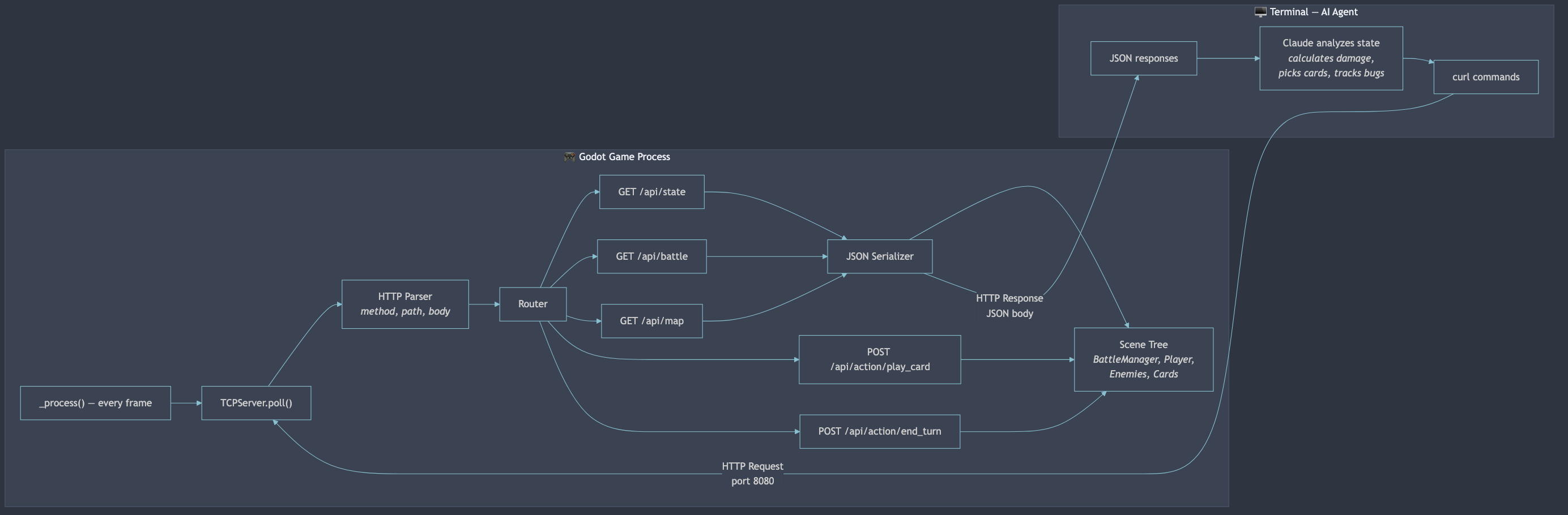 The debug server lives inside the game's main loop. Every frame it polls for HTTP requests, routes them to handlers, and responds with serialized game state.
The API: Exposing the Entire Game
The API ended up covering every system in the game:
| Endpoint | What It Does |
|---|---|
GET /api/state | Current screen, player HP/energy/block, run progress |
GET /api/battle | Hand cards, enemy HP/intents, turn state, pile sizes |
GET /api/map | All nodes, connections, available choices |
GET /api/rewards | Current reward phase, card/vessel/recipe choices |
GET /api/forge | Inventory, craftable recipes, recyclable cards |
POST /api/action/play_card | Play a card by hand index |
POST /api/action/end_turn | End the player's turn |
POST /api/action/select_node | Choose a map node |
POST /api/action/pick_reward | Choose a reward |
POST /api/action/craft | Craft a card at the forge |
The hardest part wasn't the HTTP parsing—it was serializing Godot's game state to JSON. GDScript enums don't serialize. Node references can't be JSONified. Status effects are objects with internal state. Enemy intent patterns are arrays of resources.
Every handler has to walk the scene tree, pull data from managers, and build a plain dictionary:
func _handle_battle() -> Dictionary:
    var bm = scene.get("battle_manager")
    var enemies = bm.get_enemies()

    for enemy in enemies:
        var intent_pattern = enemy.get("intent_pattern")
        var intent_index = enemy.get("intent_index")
        edata["current_intent"] = intent_pattern[intent_index % intent_pattern.size()]
It's 1,100 lines of serialization code. Not glamorous. But it means every piece of game state is visible and controllable from outside the engine.
Telling the AI to Play
With the API running, I wrote a Claude Code skill—basically a prompt file that teaches the AI how to launch the game, interact with every endpoint, and make strategic decisions.
The skill file documents every endpoint, every action body, every game mechanic. Enemy patterns, damage calculation order, status effect timing. It's a complete player's manual written for an API consumer.
Then I typed /play-game and watched Claude start issuing curl commands:
# Start the game
curl -s -X POST http://localhost:8080/api/action/start_game

# Check the map
curl -s http://localhost:8080/api/map | python3 -m json.tool

# Select a battle node
curl -s -X POST -H "Content-Type: application/json" \
  -d '{"node_id": 0}' http://localhost:8080/api/action/select_node

# Check battle state
curl -s http://localhost:8080/api/battle | python3 -m json.tool
The AI reads the battle state, sees enemy intents, evaluates its hand, calculates damage through block and burn modifiers, and decides which cards to play. It tracks HP across floors, makes strategic reward choices, decides when to visit forges versus rest sites.
It's playing the game. Through curl. By reading JSON.
And it's taking notes on everything.
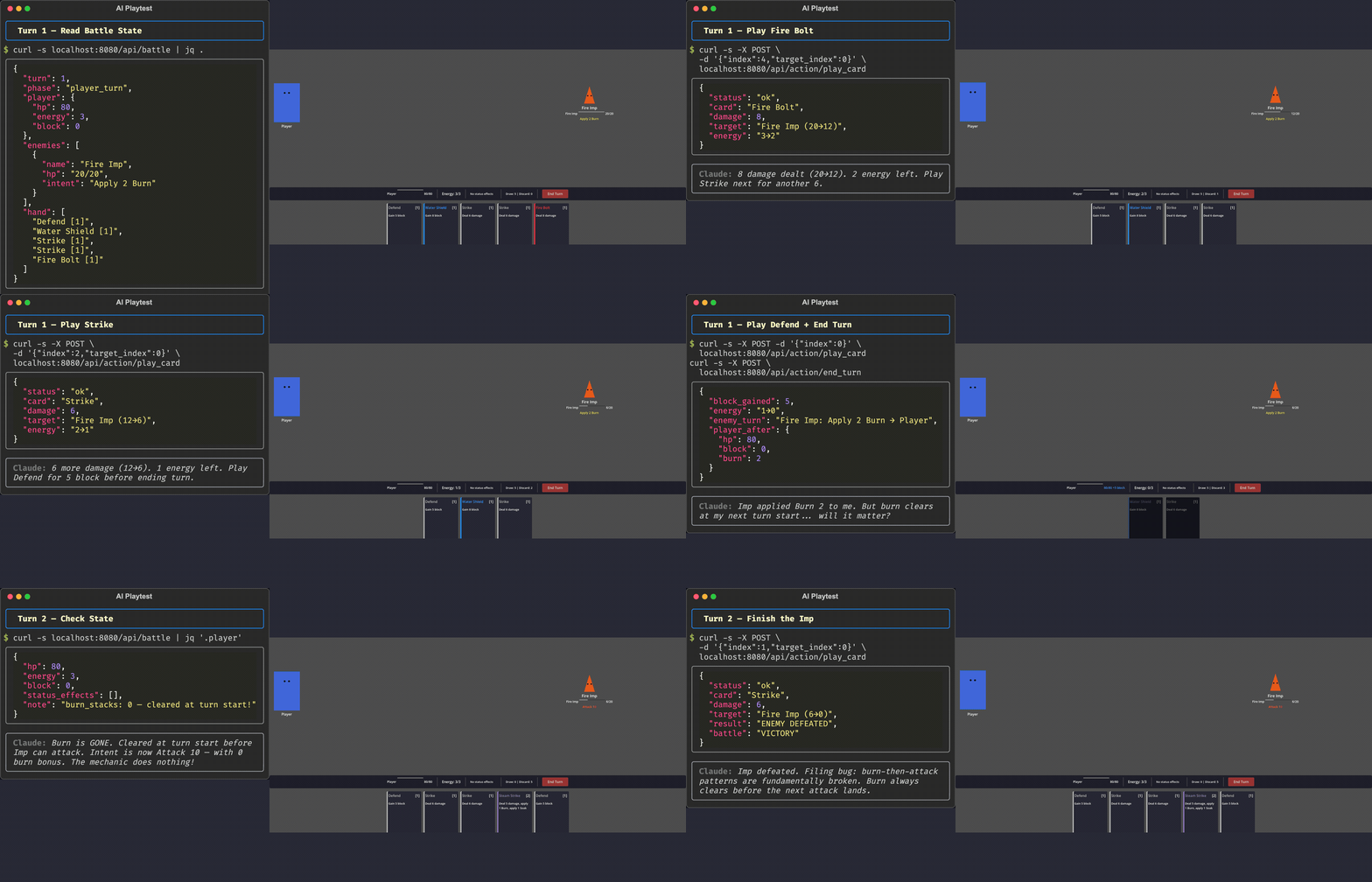 Claude reads battle state, calculates damage through burn and block modifiers, picks cards, ends turns — all through HTTP. The game window updates in real time.
The First Bug: Found in Five Minutes
Within the first playtest, the AI noticed something I'd missed:
"BUG: Burn 1 still shows in player status_effects after returning to map. Status effects should clear between battles."
Burn stacks were persisting between encounters. I'd fought dozens of battles manually and never noticed—because I wasn't staring at raw status effect arrays between fights. The AI was reading the full state dump after every action.
This is the superpower of AI playtesting. It doesn't get bored. It doesn't skip checking the state between floors. It doesn't assume something is working because it looks right on screen.
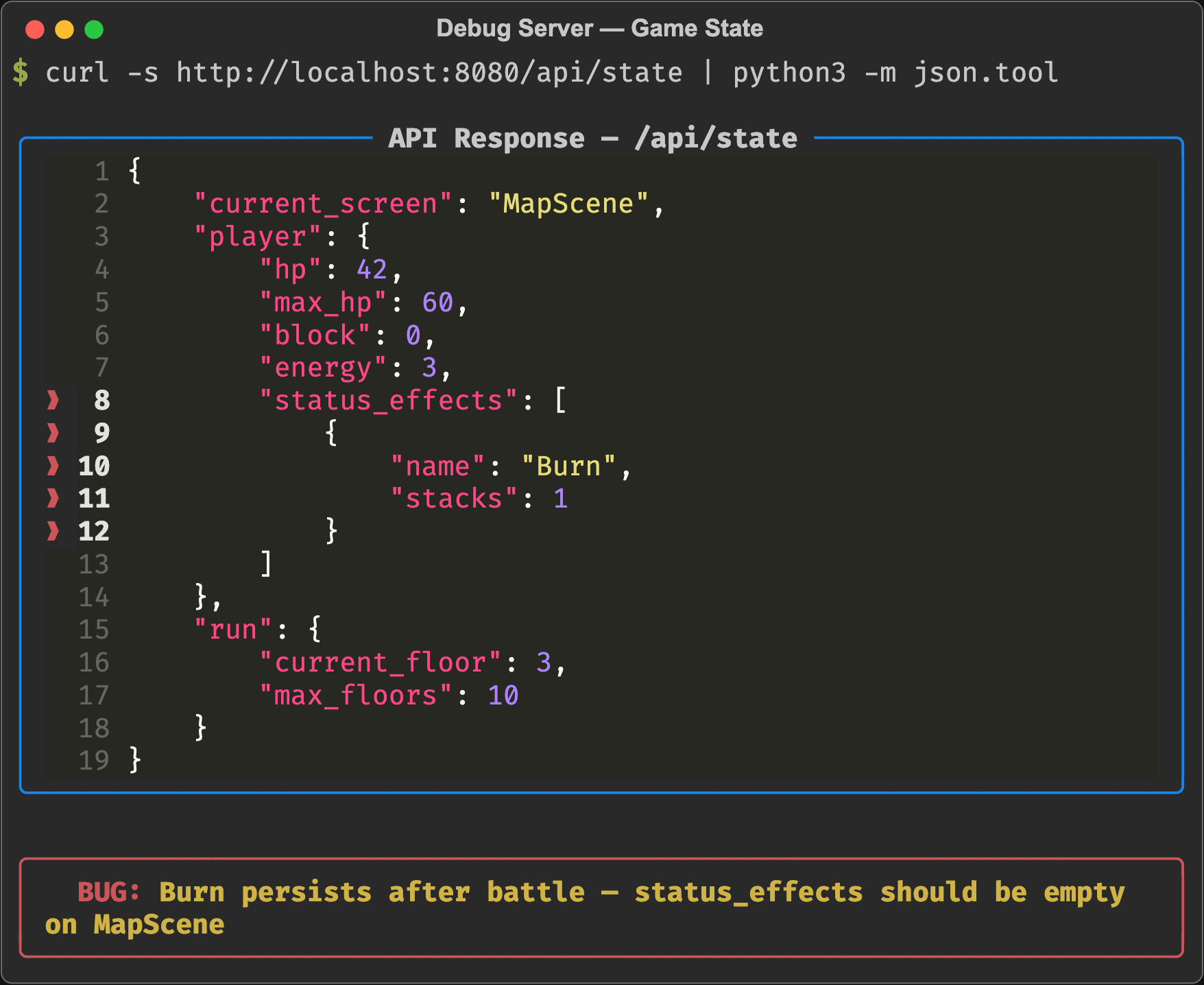 The smoking gun:
 status_effects: [{name: "Burn", stacks: 1}] on the map screen, after the battle is over. A human's eyes skip right past this. The AI flagged it immediately.
The Real Find: A Broken Mechanic Nobody Would Notice
But the big discovery wasn't a bug. It was a design flaw hiding in the game's core timing system.
The AI was fighting two Fire Imps on floor 1. Fire Imp pattern: Burn 2 → Attack 10 → Attack 4. The Imps applied Burn 2 to the player. Next turn, they'd attack for 10 each.
The AI noted something precise:
"Key insight: burn they apply will clear at my next turn start before any attacks—their Burn 2 is wasted this cycle."
Wait. Let me walk through the timing:
- Enemy turn: Fire Imp applies Burn 2 to player. Player now has Burn 2.
- Player turn start: Burn clears (stacks set to 0). Player has Burn 0.
- Player plays cards, ends turn.
- Enemy turn: Fire Imp attacks for 10. Player has 0 burn. Takes 10.
The burn applied on the enemy's turn always clears before the enemy's next attack. In a single-enemy fight, enemy burn does literally nothing.
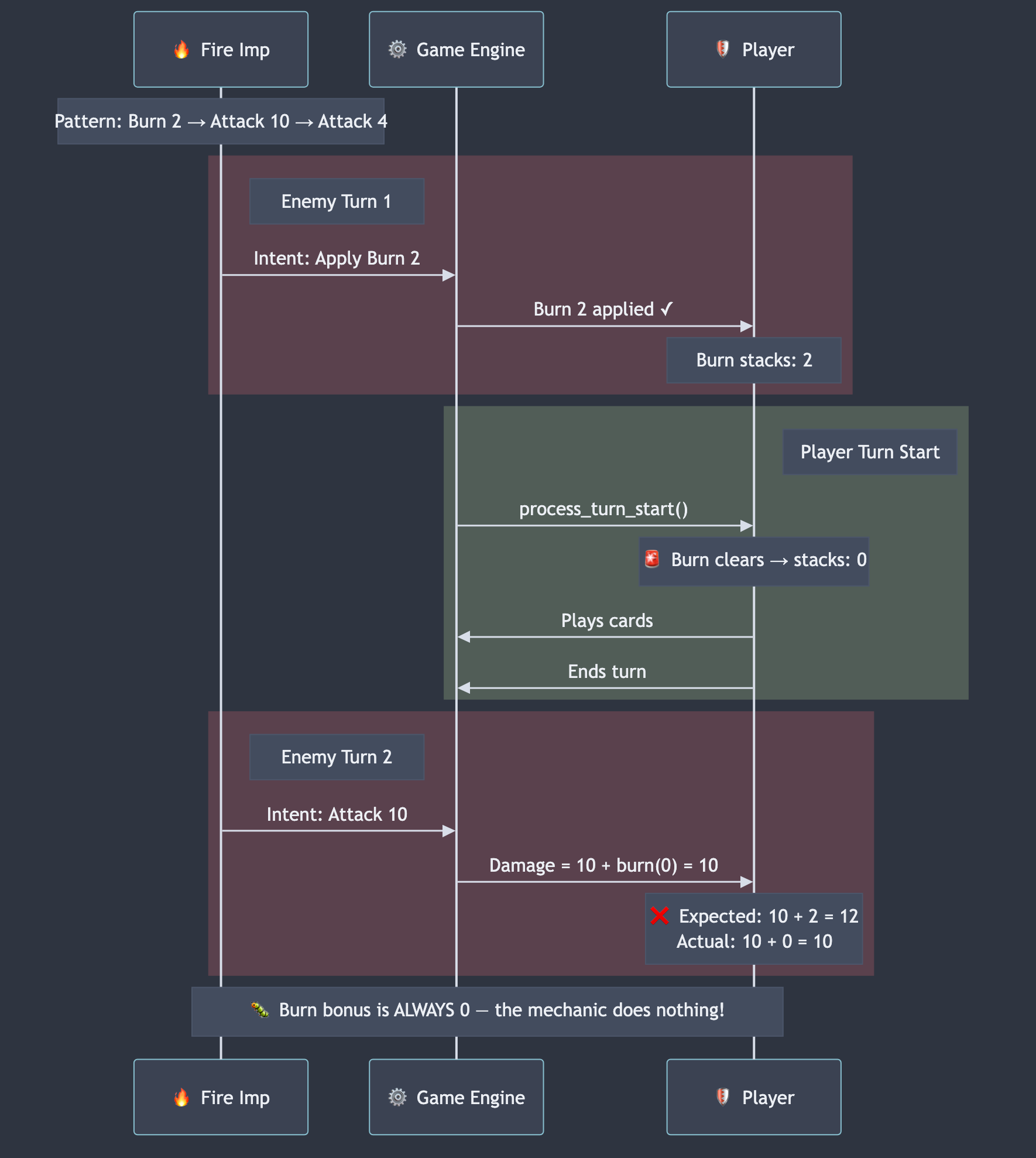 The problem visualized. Burn applied during the enemy phase clears at the very next player turn start — before the enemy ever gets to attack again. The mechanic cancels itself.
I checked the Elder Dragon—the final boss. Pattern: Attack 10 → Burn 3 → Attack 15 → Block 12. The Burn 3 on turn 2 clears at the player's turn 3 start. The devastating Attack 15 on turn 3 gets zero burn bonus.
The boss's signature mechanic was completely non-functional.
I'd been designing encounters around this burn-then-attack pattern for weeks. I'd balanced enemy damage numbers assuming burn would amplify subsequent hits. I'd written documentation describing how scary the Dragon's Burn 3 + Attack 15 combo was.
And none of it worked. The timing rules I'd implemented made it impossible.
Why a Human Missed This
Here's why I never caught this manually: the burn was being applied. The UI showed the burn icon. The stacks appeared. Everything looked correct.
On the next turn, the burn quietly cleared (as designed—"clears at turn start"), and the attack landed at its base damage. The numbers were reasonable enough that I never questioned them. The Dragon's Attack 15 is scary even without the burn bonus.
But the AI was tracking exact damage values. It calculated expected = base + burn_stacks and compared it to actual damage taken. When they didn't match—because burn was always 0 by the time attacks landed—it flagged it.
This is a class of bug that's invisible in normal play. Everything functions correctly according to the code. No crashes, no error values. The rules are being followed precisely. It's just that the interaction between rules produces a result that makes an entire game mechanic useless.
The Structured Playtest: Building a Process
After the first exploratory session, I built a structured playtest workflow. Observation categories: Map distribution, battle mechanics, reward quality, crafting economy, enemy scaling, overall balance feel. Issue classification: BUG, BAL, UX, MISS with severity levels.
I created a reusable /playtest-game skill that instructs the AI to:
- Read the game's mechanics documentation before playing
- Read previous playtest notes to check for regressions
- Play a full 10-floor run while systematically observing every system
- Document findings in a structured report with tags and severity
The second playtest (using this workflow) produced a victory run—the AI beat the Elder Dragon on turn 4 with a burn synergy deck—while simultaneously documenting six new issues and verifying three fixes from the first session.
One of the new findings: rune rewards from elite fights were being auto-assigned without showing the player a choice. The collected_runes counter incremented, but no rune name appeared anywhere in the API. The player couldn't even tell what passive buff they received.
Found because the AI checks every field in every response. Every time.
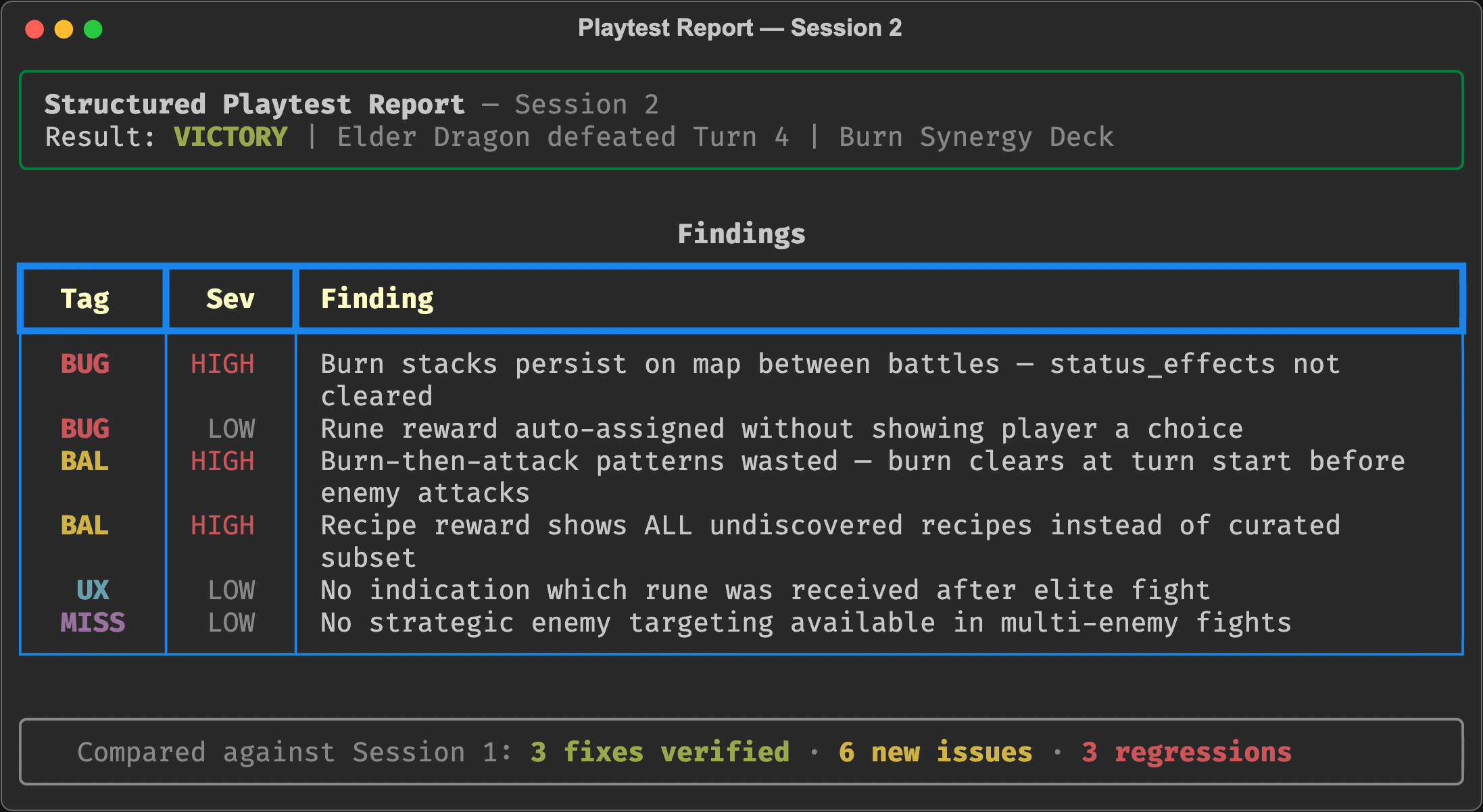 A section of the structured playtest report. Every finding is tagged by type and severity. The AI compares against previous sessions to track regressions and verify fixes.
What I Learned
1. APIs Make Everything Testable
The debug server was the highest-leverage code I wrote. 1,100 lines of serialization enabled something I couldn't do any other way: automated, repeatable, observable playtesting. Every game should have an API.
2. AI Finds Different Bugs Than Humans
Humans notice when things look wrong. AI notices when numbers don't match expectations. The burn timing bug was invisible to human eyes—it looked like the game was working. But it was obvious to an agent computing expected_damage = base + burn and comparing against actual.
3. The Bugs Are in the Interactions
The burn timing issue wasn't a bug in the burn system. It wasn't a bug in the turn system. Each system worked correctly in isolation. The bug was in how they composed—burn clearing at turn start + enemy patterns that separate burn and attack across turns = a mechanic that does nothing.
These interaction bugs are the hardest to find and the most important to fix. They're where game balance lives or dies.
4. Document Your Systems Before Testing Them
The AI could only find the burn timing bug because I'd documented how burn should work. Without the mechanics docs saying "burn adds bonus damage to each incoming hit" and "clears at turn start," there's no expected behavior to compare against.
Writing the documentation forced me to articulate the design intent. The AI found where the implementation diverged from that intent.
5. Treat AI as a Systematic Observer, Not a Fix Machine
I didn't ask the AI to "fix the balance." I asked it to "play the game and tell me what you observe." This is the same lesson as the Remotion debugging story: AI is better at diagnosis than prescription. Let it observe systematically, then bring your design judgment to the findings.
What's Next
The burn timing issue needs a design decision: make burn last 2 turns, change when it clears, or redesign enemy patterns to apply burn and damage on the same intent. I'm leaning toward option three—it's the most interesting for players because it creates "do I block the damage or accept both the hit and the burn?" decisions.
The playtest workflow is now a repeatable process. I can run /playtest-game after any code change and get a structured report comparing against previous sessions. Fixed issues get marked, regressions get caught, and new problems surface.
A solo dev with an API and an AI agent can playtest more systematically than a small QA team—not because the AI plays better, but because it never stops reading the numbers.
 The AI's victory screen. Elder Dragon defeated on turn 4 with a burn synergy deck — while simultaneously filing a six-issue bug report.